


PER8 Digital Watch Face
4.0121.00 Reviews
App Specs
- Version
- Varies with Device
- Updated On
- License
- $2.99
- Downloads
- 10,000+
- Developer
- PERSONA Watch Face
- Categories
- Personalization
- Platform
- Android
Screenshots
 Analysis by AppCompare
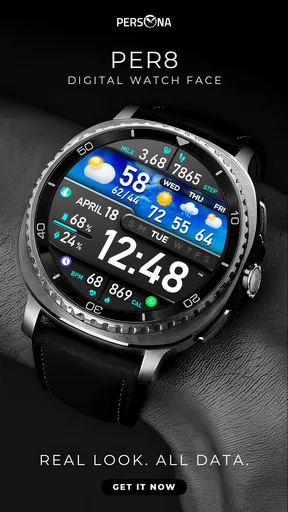
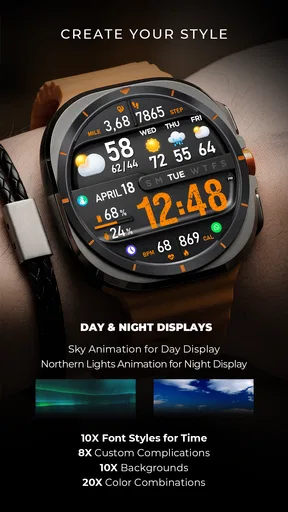
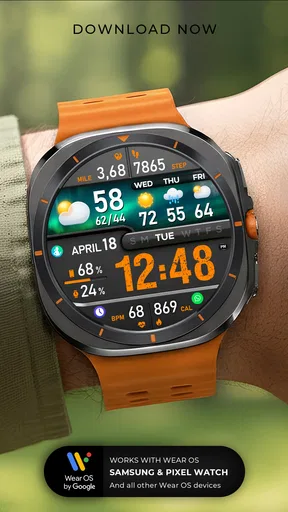
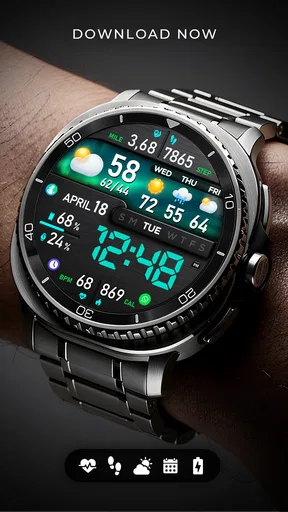
I spent time with PER8 as a compact personalization app for Wear OS, and my first impression was clear: this is a watch face for people who want their wrist to look more deliberate without turning it into a wall of information. The design focuses on an animated digital presentation, so the appeal is less about copying a traditional clock and more about giving a compatible smartwatch a distinct visual identity.
That makes it an interesting choice in a category full of faces that either imitate analog watches or compete to display every possible data point. PER8 takes the opposite route. It asks you to accept a strong visual style and then build your daily routine around reading the essentials quickly. I found that approach refreshing, although it will not suit everyone.
PER8 Digital Watch Face comes from PERSONA Watch Face, a developer focused on watch-face personalization rather than a broad collection of unrelated mobile tools. It is listed for $2.99, carries an Everyone age rating, and has reached over ten thousand installs. Its average score is four out of five from more than six hundred ratings, with over one hundred written reviews, which suggests a modest but established audience rather than a mass-market utility.
How the everyday watch-face workflow feels
The most useful way to judge this face is not by staring at it in a store preview. A watch face succeeds when it works during small, repeated moments: checking the time while walking, glancing down during a meeting, or deciding whether there is enough time before leaving home. PER8 is built around those brief looks. Its digital layout is immediately more contemporary than a conventional dial, and the animation gives the display a little movement instead of making it feel like a static label.
My recommended baseline is simple. Install it, make it your default face for a full day, and resist changing it every few minutes. That first day tells you more than a quick preview because you notice whether the digits remain comfortable to read in the situations where you actually use a watch. A face can look impressive in a screenshot and still feel tiring when checked repeatedly. PER8 works best when you appreciate its visual personality and do not need the display to behave like a plain utility panel.
The animated treatment is also a practical compromise. It gives the watch a sense of motion, but the face remains digital rather than decorative in the way some elaborate analog designs can be. For someone who wants a modern appearance while keeping time at the center, that balance is the main reason to consider it.
There is a useful distinction between wearing this face and merely trying it. If you switch watch faces according to clothing, work context, or mood, PER8 can serve as a distinctive option in that rotation. If you want one neutral face that disappears into the background, a simpler digital face may be more comfortable. PER8 has a point of view, and that is both its strength and its main limitation.
Worth Reading Before You Choose

EA SPORTS FC Mobile 26 Is a Bigger Football Game, but It Takes Time

Flipboard Shows What News Apps Must Do Beyond the Feed

Switching to Android Auto Means Rethinking Your Driving Routine

Google Calendar Makes a Crowded Week Easier to Manage

Ludo King Makes the Most of the Minutes Between Plans

Baby Panda World Brings Quick Play to Modern Phones, but Its Game Library Feels Busy
What I would check before settling on it
Compatibility should be the first practical question because this is specifically a Wear OS watch face, not a general phone personalization tool. Before paying, I would confirm that the intended watch uses Wear OS and that the installation route offered for the device is the one you normally use. This matters more than the phone operating system alone: owning an Android phone does not automatically mean every watch-face experience will be identical, and an iPhone user should be especially careful to verify the watch setup before committing.
The price also changes how I would evaluate it. At $2.99, I would not expect an enormous customization suite or a face that replaces every possible tool on the watch. I would expect a focused visual product that earns its place through design and daily readability. That is a reasonable standard here. If the animated digital look immediately appeals to you, the cost is relatively easy to justify; if you are only mildly curious, a free alternative may be the wiser experiment.
After installation, I would check the available face settings rather than assuming the default arrangement is the only sensible one. The exact options shown can depend on the watch and Wear OS environment, so I would focus on the controls that are actually presented: readability, any selectable visual choices, and the way information is arranged. The important habit is to adjust one thing at a time. Changing several settings together makes it difficult to tell whether a problem came from the layout, the contrast, or simply unfamiliarity.
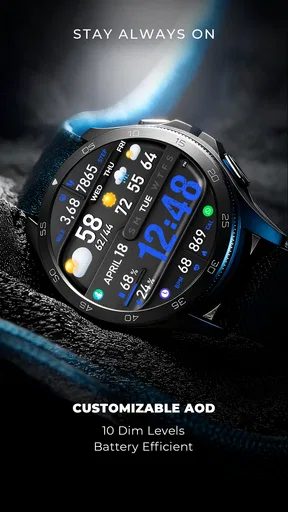
I also recommend checking the face in both active and ambient viewing situations. A design that looks excellent when the screen is fully awake may feel less convenient when you only want a quick low-distraction glance. This is not a criticism unique to PER8; it is a normal trade-off for animated and style-led faces. The more visual character a face has, the more carefully you should judge it under the conditions in which you actually wear the watch.
Small habits that make the design easier to live with
Experienced users tend to treat a watch face as part of a routine rather than a decoration selected once. With PER8, I would place the most important glance moments first. For example, use the face during a commute, at a desk, and outdoors before deciding whether it belongs on the watch permanently. Those environments expose different weaknesses: reflections outside, quick glances while moving, and the temptation to overread a busy display at work.
Another useful habit is to avoid judging the animation while actively watching it. The point is not to sit and observe the effect. The point is whether it adds personality without interrupting the quick act of reading the time. When I evaluate an animated face, I deliberately look down for only a second, then return to what I was doing. That test is more honest than admiring the face while stationary.
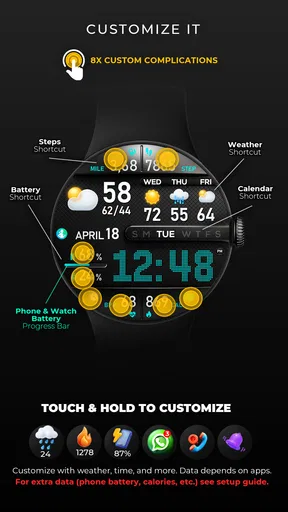
If your watch supports shortcuts or complications around the face, use them as part of a repeatable pattern rather than filling every available space. Keep the items you check most often in familiar positions and leave visual breathing room where possible. PER8’s appeal depends on its digital composition, so covering it with too many extra elements can defeat the reason you chose it. A restrained setup is likely to feel more intentional than a maximum-information setup.
This is one of the less obvious trade-offs with a design-led face: customization is not always improved by adding more. The best result may come from accepting the face’s original visual hierarchy and only changing what interferes with your routine. If you need a dashboard for exercise, weather, appointments, battery status, and communication, you may be asking PER8 to do a job better handled by a data-heavy alternative.
Faster patterns for real daily use
A realistic scenario is a workday in which your phone stays in a bag or pocket. In the morning, I would use PER8 for quick time checks while preparing to leave, then keep the same arrangement during the commute and at the desk. The advantage is consistency: once your eyes learn where the main time display sits, you can glance without mentally searching. That benefit is easy to overlook because it comes from repetition rather than a dramatic feature.
For meetings, the face can be useful if you prefer a clean digital readout over an analog hand position. A quick glance tells you how much time remains without requiring interpretation. On the other hand, if the animation or styling draws your attention more than you want in a formal setting, a quieter face may be better. I would not call PER8 a universal professional face; I would call it a face that can work professionally when its visual tone matches your surroundings.
For evenings and weekends, the same design can make the watch feel less like a miniature instrument panel. This is where the personalization category matters. You are not installing PER8 because you need a new timekeeping engine. You are using it to change the character of a device you already wear. The value comes from making the watch feel more like yours, especially if the default faces on the device seem bland.
A good shortcut is to keep a second, more functional face available for situations that demand extra information. Wear OS makes switching between faces part of normal use, and there is no reason to force one design to handle every context. I would use PER8 when appearance and quick time reading matter most, then switch to a utility-focused face before a workout, travel day, or schedule-heavy afternoon. That is a more practical workflow than rejecting it simply because it does not replace a full dashboard.
Another repeatable pattern is to make changes when you have time to test them, not when you are already rushing. Set up the face at home, check it under your usual lighting, and then leave it alone for several hours. If you change it immediately before going out, you may mistake unfamiliarity for poor design. Digital faces often become easier to read after a short adjustment period because your eyes learn their spacing and rhythm.
Where the focused approach reaches its limits
The biggest limitation is that PER8’s identity is visual. People who prefer a highly practical watch face may find it too style-led, particularly if they want several data points visible at once. A face with extensive complication support or a configurable information grid would be a better choice for users who treat their smartwatch as a dashboard. PER8 is not the one I would choose for monitoring many categories of information from a single glance.
Animation can also be a matter of taste. Some users enjoy a moving face because it makes the watch feel alive; others want the display to remain as quiet and predictable as possible. If you are sensitive to visual motion or simply prefer a static presentation, the animated concept may become a source of irritation rather than a benefit. That is not something settings can always solve, because motion is central to the face’s character.
There is also a learning curve whenever a face departs from familiar watch conventions. An analog face communicates through hand positions that many people read almost automatically. A digital face is usually faster once understood, but its typography, spacing, and animation determine how quickly that understanding happens. I would give PER8 a fair trial across several everyday situations before deciding, while still accepting that some wrists will prefer a more conventional layout.
Compared with the usual alternatives, PER8 sits between a plain digital face and an elaborate data dashboard. It has more personality than a minimal clock, but it is less suited to people who want their watch to display every available metric. Compared with analog designs, it offers a more direct time readout and a more modern visual language, while giving up some of the familiar calmness of hands and markers. That middle position is precisely why it can be appealing, but it also means the buying decision depends heavily on personal priorities.
The developer, PERSONA Watch Face, keeps the product’s identity clear rather than presenting it as a general-purpose productivity tool. I appreciate that focus. Still, a focused product should be judged honestly: the face needs to earn its place through appearance, comfort, and repeat use, not through a long feature checklist. If the design does not make you want to look at your watch, no amount of setup advice will change that.
My verdict after building a repeatable setup
I would recommend PER8 to someone who wants a Wear OS watch face with a distinctly animated digital style and who is comfortable choosing appearance over maximum information density. It is especially suitable for a user who checks the time often, likes a modern wrist display, and is willing to spend a few minutes testing the layout in real conditions. The price is modest enough for a design purchase, provided the visual concept already appeals to you.
I would steer away from it if your first requirement is a dense health, weather, calendar, or activity dashboard. I would also skip it if you dislike animated interfaces or want a face that blends into every setting without attracting visual attention. In those cases, a simpler digital face or a more configurable utility face will probably feel more natural and offer better value.
My preferred approach is to use PER8 deliberately: confirm Wear OS compatibility, test the default presentation, adjust only the settings that affect your actual routine, and keep a more information-heavy face available for demanding days. That workflow lets the design do what it does well without expecting it to become something else.
Overall, I see PER8 as a successful piece of watch personalization rather than an all-purpose smartwatch control center. Its animated digital look gives a compatible watch a stronger personality, and its focused presentation can make ordinary time checks feel cleaner and more distinctive. The best reason to choose it is not the feature count, but whether its visual rhythm makes you enjoy wearing the watch more. For the right user, that is a worthwhile improvement; for everyone else, the usual restrained or data-rich alternatives will be the better fit.
Pros
- Clean digital layout makes the time easy to read at a glance.
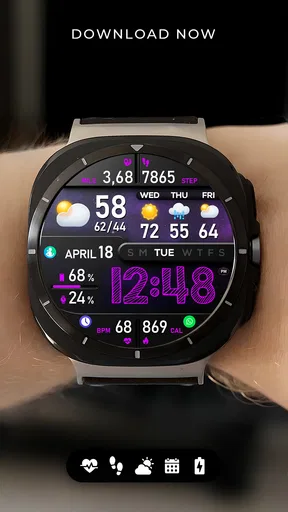
- Offers multiple customization options for colors and displayed information.
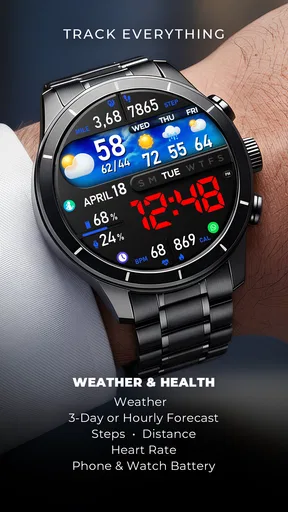
- Supports useful complications for weather
- battery
- steps
- and other data.
- Designed for quick access to essential information during daily use.
- Works well for users who prefer a modern
- uncluttered watch face.
Cons
- Some advanced features may require a paid upgrade or premium access.
- Compatibility can vary depending on the smartwatch model and Wear OS version.
- The number of available complications may feel limited for power users.
- Bright color options can reduce readability in certain lighting conditions.
- Customization may take time because settings are spread across several options.
FAQs for PER8 Digital Watch Face
What is PER8 Digital Watch Face?
PER8 Digital Watch Face is a customizable digital watch face designed for compatible Wear OS smartwatches. It focuses on a clean, information-rich layout, typically displaying the time alongside useful details such as the date, battery level, and activity or system information. Its exact appearance and available features may depend on the watch model, Wear OS version, and the customization options included by the developer.
Which smartwatches are compatible with PER8 Digital Watch Face?
Before downloading, check the app listing carefully for supported devices. PER8 Digital Watch Face is intended for compatible Wear OS watches, but not every smartwatch using a similar platform will work with it. Older devices, proprietary systems, and some region-specific models may be excluded. Compatibility can also vary according to screen shape, Wear OS version, and whether the watch supports third-party downloadable faces.
Can I customize the PER8 Digital Watch Face?
The main attraction of PER8 Digital Watch Face is its ability to adapt the display to your preferences. Depending on the installed version and your smartwatch, customization may include color themes, time formats, complications, information fields, and display behavior. Some options may only be available through the watch-face settings or a companion configuration screen, so it is worth exploring those controls after installation.
Does PER8 Digital Watch Face affect battery life?
Like any active watch face, PER8 Digital Watch Face may have a small effect on battery consumption, especially when it uses bright colors, frequent updates, animations, complications, or always-on display support. In normal use, the impact should depend largely on your watch hardware and selected settings. Reducing brightness, limiting complications, and disabling unnecessary always-on elements can help extend battery life.
Is PER8 Digital Watch Face free to download and use?
The availability and pricing of PER8 Digital Watch Face can vary depending on the store listing, promotional offers, and the developer’s current distribution model. Some versions may be free, while certain customization features could require payment or an in-app purchase. Review the official Google Play listing before installing, and check permissions, purchase information, recent updates, and user reviews to avoid surprises.


